


Table of Contents
Preface
When buying computers, we often hear often, e.g., Laptop 16 inch with i7-13700K Processor (13th Generation), 16 cores. From this, we generally know that one CPU may contain multiple cores. But what about processes and treads? In my daily job I rarely touch these core concepts since most packages already handles well for you. I only know roughly that multithreading and multiprocessing help on speeding up the application in a smart way, but how, I don’t know. Nevertheless, when people are discussing that python will gradually relax the GIL (Global Interpreter Lock) which affects the multithreading, it intrigues me a lot and I want to know better the idea behind it.
At the beginning these technology specifications seems to be overwhelming, but actually the core concept is not that difficult to understand as I read more articles.
There are several online discussions or posts that have sometimes different opinions, which might also cause confusion. This is why I want to put all I have read and learned into one post (with experimentation to find out the truth) and hope these will also help you save time if you have same questions as I did. At the same time, I will also compare the performance of single-thread, multi-thread, and multi-process, with and without GIL in python.
What are all these terminologies?
CPU, Core, Process, and Thread
I hope with one graph and a legend displayed below, it can clearly explains to you what each of them means.
🧠 CPU
 ├── 🧩 Core 1
 │    ├── 🏭 Process A
 │    │    ├── 🧵 Thread A1
 │    │    ├── 🧵 Thread A2
 │    │    └── 🧵 Thread A3
 │    └── 🏭 Process B
 │         ├── 🧵 Thread B1
 ├── 🧩 Core 2
 │    └── 🏭 Process C
 │         ├── 🧵 Thread C1
 │         └── 🧵 Thread C2
 └── ...
🧠 CPU → The entire processor. 1 CPU contains one to multiple cores.
🧩 Core → Independent execution unit (One core can run one or more processes or threads).
🏭 Process → Independent program with its own memory space in execution.
- The operating system schedules processes to run on CPU cores.
- Each process has its own memory space and system resources, i.e., memory is not shared across processes.
- And based on the graph, multiple processes can be distributed across multiple cores.
🧵 Thread → A smaller unit of execution inside a process.
- Threads within the same process share memory and resources.
- Threads are lighter than processes and switch faster, but they can interfere with each other if not synchronized properly within the same process.
One vivid example that I would like to quote describes well how process and thread differ:
Example: Microsoft Word
When you open Word, you create a process. When you start typing, the process spawns threads: one to read keystrokes, another to display text, one to autosave your file, and yet another to highlight spelling mistakes.
By spawning multiple threads, Microsoft takes advantage of idle CPU time (waiting for keystrokes or files to load) and makes you more productive.Source: Brendan Fortuner – Intro to Threads and Processes in Python
GIL in Python
Now let us talk about the global interpreter lock (GIL) in python. So what is GIL, and how does it affect multithreading?
In one line sentence, Global Interpreter Lock (GIL) is a mutex (or a piece of code) in CPython. It ensures only one thread executes CPython bytecode at a time.
The mechanism used by the CPython interpreter to assure that only one thread executes Python bytecode at a time. This simplifies the CPython implementation by making the object model (including critical built-in types such as
dict) implicitly safe against concurrent access. Locking the entire interpreter makes it easier for the interpreter to be multi-threaded, at the expense of much of the parallelism afforded by multi-processor machines.”
Source: Python Docs – Global Interpreter Lock
When you install Python, it is standard to install CPython that is written in C since CPython helps compile your .py code into bytecode and runs it on the CPython interpreter (a virtual machine) and helps manage memory, garbage collection and the GIL.
From the quote we know that GIL:
- defines the behaviour other implementations should follow.
- simplifies memory management (as multi-thread within the same process would share the same memory and you need to be careful that one thread doesn’t override another thread’s result.)
- but it limits true parallelism.
There are other implementations for comparison, just FYI:
- Jython: runs on the Java Virtual Machine and uses Java’s thread model which is fully multithreaded and has no GIL.
- IronPython: runs on
.NET CLR, using.NET‘s thread-safe environment and has no GIL.
Multithreading and Multiprocessing
🧵🧵🧵 Now we can better understand the mechanism of multithreading:
- it runs multiple threads within the same process, and they share the same memory space.
- due to GIL, only one thread executes Python bytecode at a time. Therefore, multithreading runs threads **not in a PARALLEL way, but in a CONCURRENT way**! 😱😱😱
- Concurrent: Code that can be executed out of order but still only one thread gets executed at any given time.
- Parallel: Capability to execute code at the same time.
- so multithreading doesn’t speed up CPU-bound tasks (e.g., heavy math calculation, image/video compression), but best for I/O-bound tasks (e.g., read/write files, network requests HTTP APIs, database queries, download/upload files)
🏭🏭🏭 On the other hand, for multiprocessing:
- it runs multiple processes, each with its own Python interpreter and memory space.
- Not limited by GIL — each process can run on a separate CPU core.
- In contrast to multithreading, multiprocessing is best for CPU-bound tasks (and also not bad for I/O-bound tasks).
References:
- The article Difference Between Concurrency and Parallelism by TechDifferences provides a good overview (also with a YouTube video within) of the differences between concurrency and parallelism. I have summarized the most important terms in one sentence interpretation in the above, but you can refer to this article for more vivid details.
- The article Multithreading VS Multiprocessing in Python by Amine Baatout is highly recommended to be read through.
- Readers can also refer to the article Probably the Easiest Tutorial for Python Threads, Processes and GIL, which contains quite some nice pictures demonstrating relationships between multi-processing and multi-threading.
Experiment
We will follow the second article (Multithreading VS Multiprocessing in Python by Amine Baatout) in the previous references section to demonstrate speed difference between multithreading and multiprocessing.
Env:
I execute the following experiment with python 3.11 (so GIL is always there as part of the standard CPython build).
Processor: 12th Gen Intel(R) Core(TM) i7-12700F (2.10 GHz)
Installed RAM: 16.0 GB (15.8 GB usable)
System type: 64-bit operating system, x64-based processor
Edition: Windows 11 Home
Version: 24H2
Multi-threading is not run parallelly but concurrently
It demonstrates that multithreading doesn’t run in parallel but concurrently via the experiment code, which I have forked and run in my machine and plotted the result below as Fig.1.
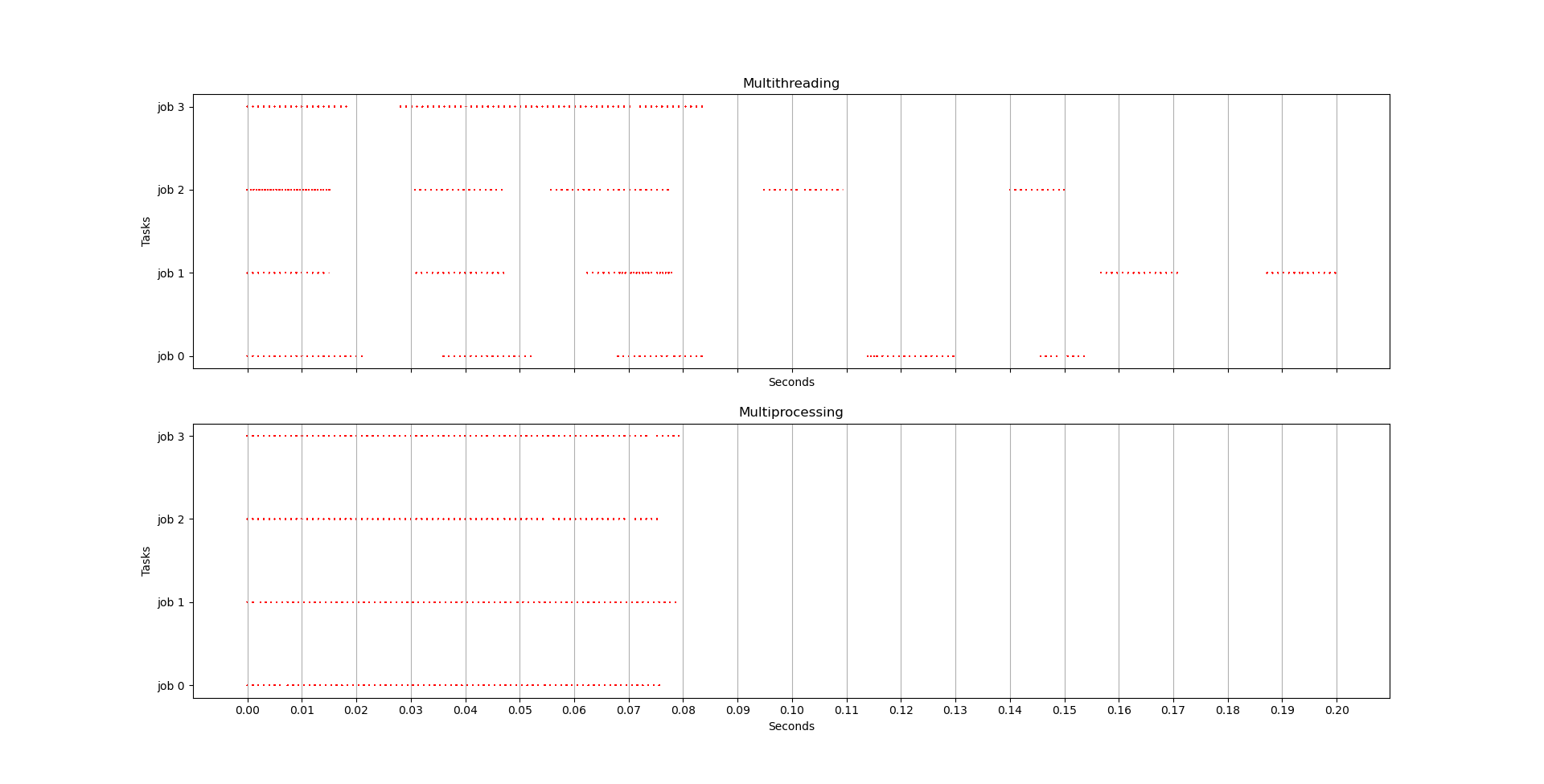
From the figure, we confirm that multithreading indeed runs threads neither in parallel nor in sequential. They are run concurrently: at any given time, only one thread proceeds a little, and the other takes on.
CPU-heavy task
It demonstrates that multithreading performs badly on CPU-heavy tasks (can be even worse than single-threaded sequential execution). You can try the code in experiment code for CPU-heavy task comparison, which contains a simple but heavy math calculation function for execution speed testing.
Key CPU-heavy function is:
def cpu_heavy(x):
    print('I am', x)
    count = 0
    for i in range(10**10):
count += iMy output is:
Serial spent 3529.652628898620
Multithreading spent 4591.425851583481
Multiprocessing spent 3783.1801719665527Based on the above result, multithreading performs indeed worse than serial execution on CPU-heavy task. But surprisingly, multiprocessing doesn’t perform better than single thread execution. Perhaps more finer experiment should be done for a finer inspection.
I/O-heavy task
We will firstly demonstrate that multithreading performs well for I/O-heavy tasks. You can try the code in experiment code for I/O-heavy task comparison, which reads many URLs and compare execution speed.
Key I/O-heavy function is:
urls = [...]  # a list of many urls
def load_url(x):
    # print('I am', x)
    with urllib.request.urlopen(urls[x], timeout=20) as conn:
        return conn.read()
for i in urls:
load_url(i)My output for multithreading is:
Serial spent 3.4708025455474854
Multithreading 4 spent 1.1974174976348877
Multithreading 8 spent 0.7969970703125
Multithreading 16 spent 0.6970319747924805This again confirms that multithreading is faster than single thread sequential execution for I/O-bound tasks. And as we are using more n_jobs = 4, 8, 16 in multithreading, the requested time decreases (but the amount decreased are getting smaller).
Now let us conduct the same experiment for I/O-heavy task but this time under multiprocessing mode. The key function remains the same as the previous one, but my output this time is for multiprocessing:
Serial spent 3.4771108627319336
Multiprocessing 4 spent 1.3483104705810547
Multiprocessing 8 spent 1.00370454788208
Multiprocessing 16 spent 1.0825281143188477This shows that multiprocessing is also very fast compared to the single thread execution, but in my case it performs a bit worse than multithreading. Hence, concluded that multithreading performs best on I/O-bound tasks, and multiprocessing on the second place.
GIL becomes optional starting from python3.13+
We have introduced in previous sections what GIL is and how single-thread, multi-thread, multi-process differ in speed under python 3.11 (with GIL). Interestingly, starting from Python 3.13+ the official releases an experimental build with the so called Free-threaded CPython (to differentiate from standard CPython) that removes GIL.
Without GIL being possible to be removed, the multi-threading is no longer limited by it and might have the chance to be much faster within a process! For more details of this change, please see PEP703.
Later we will also do the experiment again on single-thread, multi-thread, multi-process to see if they are affected by removing the GIL setting. But before that, you may want to learn first how to install a free-threaded version, i.e., be able to turn-off the GIL setting:
- If you want to install py3.13+ without GIL, then you can go to the official website and download any python 3.13 or 3.14 version. When installing, make sure you check the box “download free-threaded binaries (experimental)”. Once installed, you will find the file name is also different than usual, called `python3.13t` (or python3.14t), in the dedicated installation folder.
- For more details, you can follow the YouTube video- How to Disable GIL in Python3.13 by 2MinutesPy (really just 2 minutes).
- **Warning**: according to another YouTube video- R.I.P GIL in Python 3.13 | Will Python Be Faster Now? by 2MinutesPy, multithreading is indeed much faster in their demo when using python3.13t, however, major popular libraries such as Django or FastAPI might be broken since they use
asyncioandanyiorespectively, which all usetreadingpackage where GIL plays a major role. My comment is that we can see the trend of gradually removing the GIL in future python standard build, but it will take time for existing popular libraries to adapt to this as well.
Speed with vs without GIL
In the following I reproduce the result and confirm that No-GIL mode is indeed faster than GIL mode under multithreading.
I have downloaded the python3.14t (free-threaded version) with the same computer (x64 Win11 24H2, i7-12th Gen 16GB RAM).
To turn on/off the GIL in python 3.14t, we can simply give the evnrionment variable `PYTHON_GIL` or the command-line option `-X gil`. For more details, please see Python Docs- The global interpreter lock in free-threaded Python.
We will compare if python, with and without GIL lock, runs faster or not when executing single-thread/multi-thread/multi-processing on the CPU-bound tasks compute_factorial:
import math
import threading
import multiprocessing

# target CPU-heavy task
def compute_factorial(n):
    return math.factorial(n)

# three different ways to execute the CPU-heavy task
def single_threaded_compute(n):
    for num in n:
        compute_factorial(num)
    print("Single-threaded Factorial Computed.")

def multi_threaded_compute(n):
    threads = []
    # create 5 threads
    for num in n:
        thread = threading.Thread(target=compute_factorial, args=(num,))
        threads.append(thread)
        thread.start()

    # wait for all threads to complete
    for thread in threads:
        thread.join()
    print("Multi-threaded Factorial Computed.")

def multi_processing_compute(n):
    processes = []
    # create a process for each number in the list
    for num in n:
        process = multiprocessing.Process(target=compute_factorial, args=(num,))
        processes.append(process)
        process.start()

    # wait for all processes to complete
    for process in processes:
        process.join()
    print("Multi-processing Factorial Computed.")

...We put them under one file gil.py (source code here) so we can execute the file via python either with or without GIL setting, e.g.:
# execute the file with GIL
PYTHON_GIL=1 python3.14t gil.py

# execute the file without GIL
PYTHON_GIL=0 python3.14t gil.pyOutput with GIL:
sys info:
3.14.0rc3 free-threading build
(tags/v3.14.0rc3:1c5b284, Sep 18 2025, 09:22:50) [MSC v.1944 64 bit (AMD64)]
sys.version_info(major=3, minor=14, micro=0, releaselevel='candidate', serial=3)

Running in GIL mode 🔒
Single-threaded Factorial Computed.
Single-threaded time taken : 3.47 seconds
Multi-threaded Factorial Computed.
Multi-threaded time taken : 3.57 seconds
Multi-processing Factorial Computed.
Multi-process time taken : 1.54 secondsOutput without GIL:
sys info:
3.14.0rc3 free-threading build
(tags/v3.14.0rc3:1c5b284, Sep 18 2025, 09:22:50) [MSC v.1944 64 bit (AMD64)]
sys.version_info(major=3, minor=14, micro=0, releaselevel='candidate', serial=3)

Running in NO-GIL mode 🧵
Single-threaded Factorial Computed.
Single-threaded time taken : 3.43 seconds
Multi-threaded Factorial Computed.
Multi-threaded time taken : 1.51 seconds
Multi-processing Factorial Computed.
Multi-process time taken : 1.56 secondsFrom the above experiment we see that
- multiprocessing is not affected by GIL, which makes sense since each process is run in parallel under each different core (as mentioned before).
- multithreading without GIL is 2x faster than multithreading with GIL mode (and is roughly the same as the Multi-processing).
Summary
In this article we have introduced:
- Terminologies such as core, thread, process, CPU-bound tasks, I/O-bound tasks.
- Speed comparison between single-thread, multi-thread, multi-processing (under normal GIL mode using python3.12)
- Understand GIL and the newly released python3.14 and python3.14t (free threaded) version. Released on Oct 7th, 2025.
- Speed comparison between python3.14t with and without GIL mode for single-thread/multi-thread/multi-processing.
We have used some key functions to setup the comparison experiments:
| Function | Description |
|---|---|
compute_factorial(n) |
Computes factorial of n using math.factorial(). CPU-heavy. |
load_urls(i) |
Load i-th URL. I/O-heavy when giving multiple URLs. |
single_threaded_compute(n) |
Computes all factorials sequentially. |
multi_threaded_compute(n) |
Spawns one thread per computation. Shows GIL bottleneck. |
multi_processing_compute(n) |
Spawns one process per computation. Fully parallel since processes bypass GIL. |
Performance summary with normal python (ie, normally with GIL setting under standard CPython):
| Mode | Parallelism | Expected Behavior |
|---|---|---|
| Single-threaded | None | Baseline performance. |
| Multi-threaded | Limited (due to GIL, and actually is concurrency) | Often same or slower than single-threaded for CPU tasks. |
| Multi-processing | True parallel | Best performance on multi-core CPUs. |
Performance summary for free-threaded python 3.14t:
| Mode | Expected Behavior |
|---|---|
| Single-threaded | Not affected by GIL setting. |
| Multi-threaded | Faster speed for No-GIL setting compared to with GIL. |
| Multi-processing | Not affected by GIL setting. |
References
- Multithreading VS Multiprocessing in Python by Amine Baatout
- Code base forked from Amine Baatout and has been modified
- Intro to Threads and Processes in Python by Brendan Fortuner
- Difference Between Concurrency and Parallelism by TechDifferences
- Official Python Docs- The global interpreter lock in free-threaded Python
- YouTube video- How to Disable GIL in Python3.13 by 2MinutesPy
- YouTube video- R.I.P GIL in Python 3.13 | Will Python Be Faster Now? by 2MinutesPy
- Probably the Easiest Tutorial for Python Threads, Processes and GIL by Christopher Tao, Towards Data Science.